# Poison
### DEMO - https://poison.lukeorth.com/
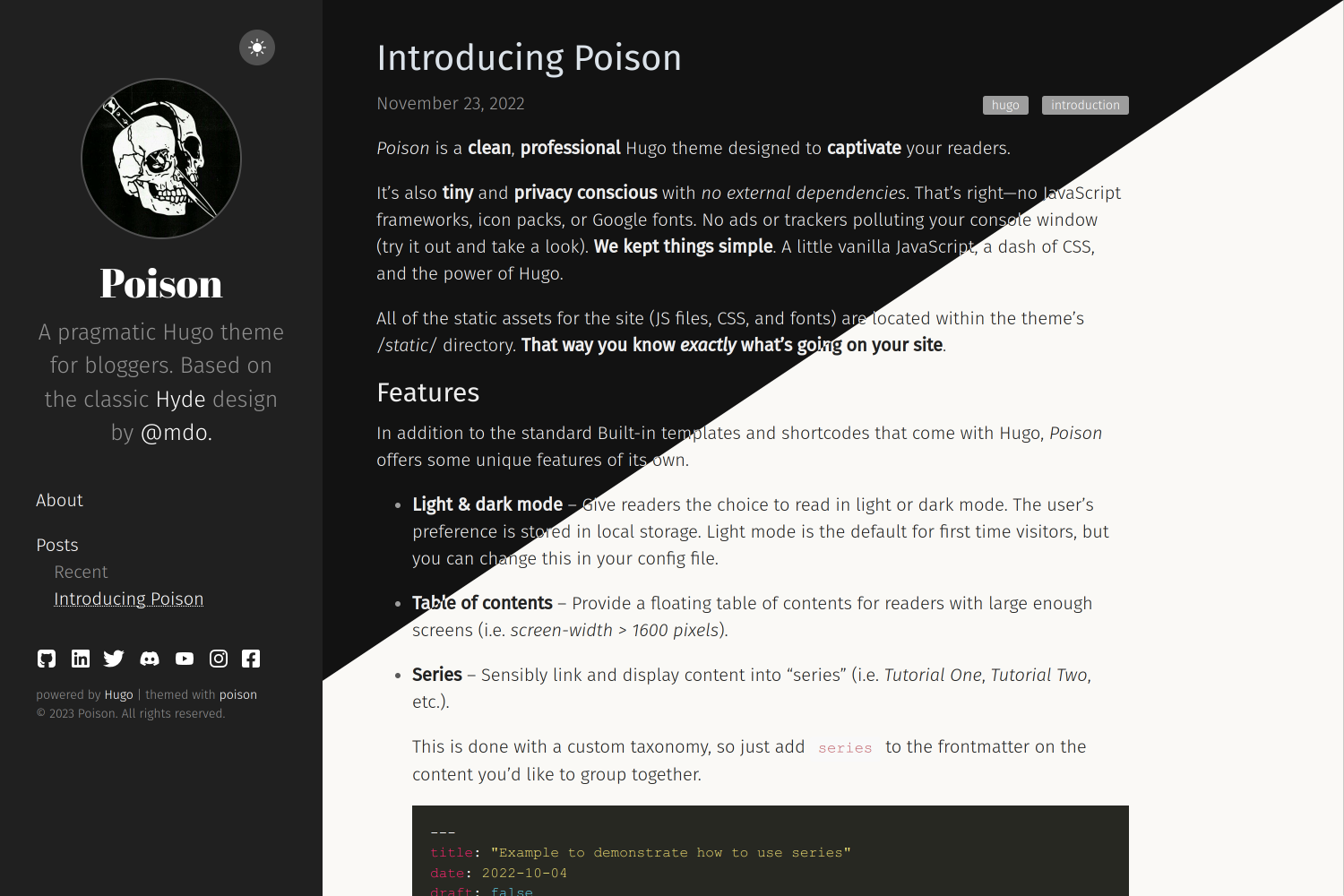
*Poison* is a **clean**, **professional** Hugo theme designed to **captivate** your readers.
It's also **tiny** and **privacy conscious** with *no external dependencies*. No JavaScript frameworks, icon packs, or Google fonts. No ads or trackers polluting your console window. **We kept things simple**. A little vanilla JavaScript, a dash of CSS, and the power of Hugo.
All the static assets for the site (JS files, CSS, and fonts) are located within the theme's */assets/* directory. **That way you know *exactly* what's going onto your site**.
Check out our demo site's [analytics](https://plausible.lukeorth.com/poison.lukeorth.com) to gauge community interest in the theme.
---
## Contents
- [Poison](#poison)
- [DEMO - https://poison.lukeorth.com/](#demo---httpspoisonlukeorthcom)
- [Contents](#contents)
- [Features](#features)
- [Light and dark mode](#light-and-dark-mode)
- [Table of contents](#table-of-contents)
- [Comments](#comments)
- [Analytics](#analytics)
- [Email newsletters](#email-newsletters)
- [Series](#series)
- [KaTeX](#katex)
- [Tabs](#tabs)
- [Mermaid diagrams](#mermaid-diagrams)
- [PlantUML diagrams](#plantuml-diagrams)
- [Details](#details)
- [Installation](#installation)
- [How to Configure](#how-to-configure)
- [The sidebar menu](#the-sidebar-menu)
- [The front page](#the-front-page)
- [Example config](#example-config)
- [Custom CSS](#custom-css)
- [Suggestions / Contributions](#suggestions--contributions)
- [Author](#author)
- [Ported By](#ported-by)
- [License](#license)
## Features
In addition to the standard Built-in templates and shortcodes that come with Hugo, *Poison* offers some unique features of its own.
### Light and dark mode
Give readers the choice to read in light or dark mode. The user's preference is stored in local storage. Light mode is the default for first time visitors, but you can change this in your config file.


### Table of contents
Provide a floating table of contents for readers with large enough screens (i.e. *screen-width > 1600 pixels*).
If you prefer not to display a table of contents, you can disable them site-wide in your ```config.toml``` file.
```toml
[params]
hideToc: true
```
Alternatively, you can choose to disable the table of contents on a per-post basis by putting the flag in the frontmatter of an individual post.
```yaml
---
title: "Example to demonstrate how to hide the table of contents on a single post"
date: 2023-07-10
draft: false
hideToc: true
tags: ["Hugo"]
---
```
### Comments
Facilitate discourse by allowing users to comment on your posts. *Poison* currently supports two different commenting engines for this purpose -- [Disqus](https://disqus.com/) and [Remark42](https://remark42.com/).
**Note**: *Enabling comments will add external dependencies.*
- [Disqus Demo Site](https://about.disqus.com/disqus-demo-page)
- [Remark42 Demo Site](https://remark42.com/demo/)
***Disqus*** is free and easy to use. Checkout the [Hugo docs](https://gohugo.io/content-management/comments/) to get started. Once you've created a *Disqus* account, you can activate it in the *Poison* theme by adding a single line to your `config.toml` file.
```
disqusShortname = 'yourDisqusShortname'
```
This is a great option for people that don't want to bother with self-hosting their own commenting engine; however, it has some drawbacks. Because *Disqus* provides this service for free, they recoup any financial loss by injecting third-party ad trackers onto your website. These trackers help to collect and sell information about your users, while also negatively affecting your site's speed.
Even still, *Disqus* may be the best solution depending on your situation. The above paragraph is only meant to highlight its trade-offs and not meant to discourage its use entirely.
***Remark42*** is a lightweight, open source commenting engine that doesn't spy on your users. The downside is that you must host it yourself. Checkout the *Remark42* [documentation](https://remark42.com/) to get started. I also found [this blog post](https://www.devbitsandbytes.com/setting-up-remark42-from-scratch/) helpful when setting it up on [my site](https://lukeorth.com).
Once everything is set up, you can activate it in the *Poison* theme by including the following in the `[params]` section of your `config.toml` file.
```toml
[params]
remark42 = true
remark42_host = "https://yourhost.com"
remark42_site_id = "your_site_id"
```
### Analytics
Gain insights on your users. Poison currently supports [Plausible](https://plausible.io) which is available via a paid service or by [self-hosting](https://github.com/plausible/analytics). Take a look at the Poison demo site's
**Note**: *Enabling analytics will add external dependencies.*
**Check out our demo site's Plausible analytics [here](https://plausible.lukeorth.com/poison.lukeorth.com)!**
Once you've established your Plausible instance, you can activate it by adding three lines to your ```config.toml``` file.
```toml
[params]
plausible = true
plausible_domain = "myblog.com"
plausible_script = "https://plausible.myblog.com/js/script.js"
```
This will insert the necessary code in the `````` on each page and will allow your Plausible instance to collect a limited set of data on your users.
For reference, the configuration above would add the following code to each page. Adjust according to your specific environment.
``````
### Email newsletters
Allow users to subscribe to your blog newsletters via email.
Poison currently supports [Listmonk](https://listmonk.app/) which is available via [self-hosting](https://github.com/knadh/listmonk).
Listmonk is a standalone, self-hosted, newsletter and mailing list manager.
The downside is that you must host it yourself.
Checkout the Listmonk [documentation](https://listmonk.app/docs/) to get started.
Once you've established your Listmonk instance, activate it by adding these lines to your ```config.toml``` file.
```toml
[params]
listmonk = true
listmonk_host = "https://listmonk.your_domain.tld"
listmonk_subscription_list_uiid = "YOUR_NEWSLETTERS_LIST_UIID"
listmonk_subscription_form_text = "Subscribe to my newsletters" # default: Subscribe to my newsletters
listmonk_subscription_success_message = "Thanks for subscribing" # default: Thanks for subscribing
listmonk_subscription_error_message = "Something went wrong" # default: Sorry, something went wrong. Please, try again
```
This will insert a form at the bottom of each post's content.
The user will be subscribed to the newsletter specified in the ``listmonk_subscription_list_uiid`` parameter.
### Series
Sensibly link and display content into "series" (i.e. *Tutorial One*, *Tutorial Two*, etc.).
This is done with a custom taxonomy, so just add `series` to the frontmatter on the content you'd like to group together.
```yaml
---
title: "Example to demonstrate how to use series"
date: 2022-10-04
draft: false
series: "How to use poison"
tags: ["Hugo"]
---
```
### KaTeX
Make your mathematical notations pop.
For notations that should appear on their own line, use the block quotes `$$ ... $$`
$$ 5 \times 5 = 25 $$
For notations that should appear on the same line, use the inline quotes `$ ... $`
**Note**: *Enabling KaTeX will add external dependencies.*
### Tabs
Some content is just better viewed in tabs. Luckily we have a shortcode for that.


Here's the code for the tabs shown above...
```
{{}}
{{%/* tab tabName="First Tab" */%}}
This is markdown content.
{{%/* /tab */%}}
{{}}
{{}}
This is a code block.
{{}}
{{}}
{{}}
```
### Mermaid diagrams
You can embed rendered Mermaid diagrams.
**Note**: *Enabling Mermaid diagrams will add external dependencies.*
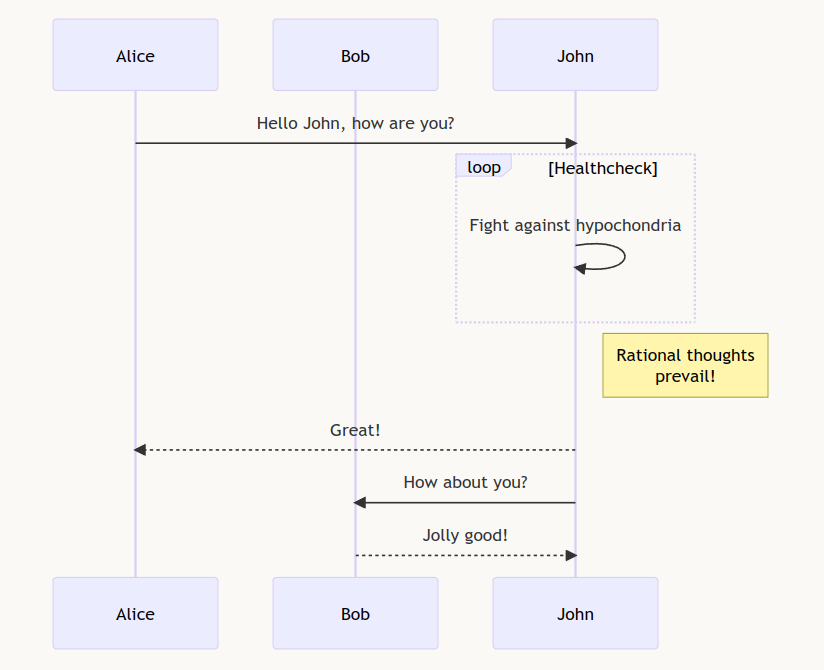
For an example of how to do this, please visit the [Poison demo site](https://poison.lukeorth.com/posts/introducing-poison/#mermaid-diagrams).
### PlantUML diagrams
You can embed rendered PlantUML diagrams.
**Note**: *Enabling PlantUML diagrams will add external dependencies.*
For an example of how to do this, please visit the [Poison demo site](https://poison.lukeorth.com/posts/introducing-poison/#plantuml-diagrams);
### Details
There's a shortcode for encoding detail dropdowns into your pages.

Here's the code for the detail dropdown above:
```
{{}}
Markdown content
{{}}
```
## Installation
First, clone this repository into your `themes` directory:
```sh
git clone https://github.com/lukeorth/poison.git themes/poison --depth=1
```
Next, specify `poison` as the default theme in your config.toml file by adding the following line:
```toml
theme = "poison"
```
Lastly, if there are any future updates to this repository that you wish to include in your local copy, these can be retrieved by running:
```sh
cd themes/poison
git pull
```
For more information on how to get started with Hugo and themes, read the official [quick start guide](https://gohugo.io/getting-started/quick-start/).
## How to Configure
After successfully installing *Poison*, the last step is to configure it.
### The sidebar menu
Any items you want displayed in your sidebar menu *must* satisfy two requirements. They must:
1. Have a corresponding markdown file in your */content/* directory.
2. Be declared in your *config.toml* file (example below).
There are two types of menu items:
1. **Single Page** -- The *About* menu item (to the left) is a good example of this. It displays a direct link to an individual page. For arbitrary single pages, the page content must be located at `content//_index.md` and the front matter of `_index.md` must contain `layout: single`.
2. **List** -- The *Posts* menu item is a good example of this. It displays a directory and dynamically lists the contents (i.e. pages) contained by date. List items have two optional configurations: a subheading (like the *Recent* subheading that appears on the menu to the left), and a maximum number of items to display.
The sidebar menu items are configured with a dictionary value in your *config.toml* file. I've included an example below. Additionally, there is a placeholder for this in the *config.toml* file shown in the next section.
**Important**: You *must* have a markdown file present at the path specified in order for your menu item to be displayed.
```toml
menu = [
# Dict keys:
# Name: The name to display on the menu.
# URL: The directory relative to the content directory.
# HasChildren: If the directory's files should be listed. Default is true.
# Limit: If the files should be listed, how many should be shown.
# SINGLE PAGE
# Note that you must put your markdown file
# inside of a directory with the same name.
# Example:
# ... /content/about/about.md
{Name = "About", URL = "/about/", HasChildren = false},
# ... /content/foo/_index.md
# {Name = "Foo", URL = "/foo/", HasChildren = false},
# LIST
# This example has a subheading of "Recent"
# and will display up to 5 items.
# Example:
# ... /content/posts/introducing-poison.md
{Name = "Posts", URL = "/posts/", Pre = "Recent", HasChildren = true, Limit = 5},
# Example of a list without a subheading or limit.
{Name = "Projects", URL = "/projects/"},
]
```
### The front page
When visiting the base url for the site, i.e. `your.domain.com/`, a paginated feed of your recently added content is displayed in reverse chronological order. By default, only content in the "posts" [page bundle](https://gohugo.io/content-management/page-bundles/) is displayed. You can configure a list of page bundle names to be included on this page by adding the `front_page_content` parameter to your config.toml file.
```toml
[params]
front_page_content = ["posts", "projects"]
```
### Example config
I recommend starting by copying/pasting the following code into your config.toml file. Once you see how it looks, play with the settings as needed.
**NOTE**: To display an image in your sidebar, you'll need to uncomment the `remote_brand_image` and set a image URL or the `brand_image` path below and have it point to an image file in your project. The path is relative to the `static` directory. If you don't have an image, just leave both lines commented out.
```toml
baseURL = "/"
languageCode = "en-us"
theme = "poison"
paginate = 10
pluralizelisttitles = false # removes the automatically appended "s" on sidebar entries
# NOTE: If using Disqus as commenting engine, uncomment and configure this line
# disqusShortname = "yourDisqusShortname"
[params]
brand = "Poison" # name of your site - appears in the sidebar
# remote_brand_image = 'https://github.com/USERNAME.png' # path to a remote file
# brand_image = "/images/test.jpg" # path to the image shown in the sidebar
description = "Update this description..." # Used as default meta description if not specified in front matter
dark_mode = true # optional - defaults to false
# favicon = "favicon.png" # path to favicon (defaults to favicon.png)
front_page_content = ["posts"] # Equivalent to the default value, add page bundle names to include them on the front page.
# MENU PLACEHOLDER
# Menu dict keys:
# Name: The name to display on the menu.
# URL: The directory relative to the content directory.
# HasChildren: If the directory's files should be listed. Default is true.
# Limit: If the files should be listed, how many should be shown.
menu = [
{Name = "About", URL = "/about/", HasChildren = false},
{Name = "Posts", URL = "/posts/", Pre = "Recent", HasChildren = true, Limit = 5},
]
# Links to your socials. Comment or delete any you don't need/use.
discord_url = "https://discord.com"
email_url = "mailto://user@domain"
facebook_url = "https://facebook.com"
flickr_url = "https://flickr.com"
github_url = "https://github.com"
gitlab_url = "https://gitlab.com"
instagram_url = "https://instagram.com"
linkedin_url = "https://linkedin.com"
mastodon_url = "https://mastodon.social"
matrix_url = "https://matrix.org"
telegram_url = "https://telegram.org"
tryhackme_url = "https://tryhackme.com"
twitter_url = "https://twitter.com"
x_url = "https://x.com"
xmpp_url = "https://xmpp.org"
youtube_url = "https://youtube.com"
signal_url = "https://signal.org"
bluesky_url = "https://bsky.app"
# NOTE: If you don't want to use RSS, comment or delete the following lines
# Adds an RSS icon to the end of the socials which links to {{ .Site.BaseURL }}/index.xml
rss_icon = true
# Which section the RSS icon links to, defaults to all content. See https://gohugo.io/templates/rss/#section-rss
rss_section = "posts"
# Hex colors for your sidebar.
moon_sun_background_color = "#515151" # default is #515151
moon_sun_color = "#FFF" # default is #FFF
sidebar_a_color = "#FFF" # default is #FFF
sidebar_bg_color = "#202020" # default is #202020
sidebar_h1_color = "#FFF" # default is #FFF
sidebar_img_border_color = "#515151" # default is #515151
sidebar_p_color = "#909090" # default is #909090
sidebar_socials_color = "#FFF" # default is #FFF
# Hex colors for your content in light mode.
code_color = "#000" # default is #000
code_background_color = "#E5E5E5" # default is #E5E5E5
code_block_color = "#FFF" # default is #FFF
code_block_background_color = "#272822" # default is #272822
content_bg_color = "#FAF9F6" # default is #FAF9F6
date_color = "#515151" # default is #515151
link_color = "#268BD2" # default is #268BD2
list_color = "#5A5A5A" # default is #5A5A5A
post_title_color = "#303030" # default is #303030
table_border_color = "#E5E5E5" # default is #E5E5E5
table_stripe_color = "#F9F9F9" # default is #F9F9F9
text_color = "#222" # default is #222
# Hex colors for your content in dark mode
code_color_dark = "#FFF" # default is #FFF
code_background_color_dark = "#515151" # default is #515151
code_block_color_dark = "#FFF" # default is #FFF
code_block_background_color_dark = "#272822" # default is #272822
content_bg_color_dark = "#121212" # default is #121212
date_color_dark = "#9A9A9A" # default is #9A9A9A
link_color_dark = "#268BD2" # default is #268BD2
list_color_dark = "#9D9D9D" # default is #9D9D9D
post_title_color_dark = "#DBE2E9" # default is #DBE2E9
table_border_color_dark = "#515151" # default is #515151
table_stripe_color_dark = "#202020" # default is #202020
text_color_dark = "#EEE" # default is #EEE
# NOTE: If using Remark42 as commenting engine, uncomment and configure these lines
# remark42 = true
# remark42_host = "https://yourhost.com"
# remark42_site_id = "your_site_id"
# NOTE: The following three params are optional and are used to create meta tags + enhance SEO.
# og_image = "" # path to social icon - front matter: image takes precedent, then og_image, then brand_url
# this is also used in the schema output as well. Image is resized to max 1200x630
# For this to work though og_image and brand_url must be a path inside the assets directory
# e.g. /assets/images/site/og-image.png becomes images/site/og-image.png
# publisher_icon = "" # path to publisher icon - defaults to favicon, used in schema
[taxonomies]
series = 'series'
tags = 'tags'
```
### Custom CSS
You can override any setting in Poison's static CSS files by adding your own
`/assets/css/custom.css` file. For example, if you want to override the title font and
font size, you could add this:
```css
.sidebar-about h1 {
font-size: 1.4em;
font-family: "Monaco", monospace;
}
```
## Suggestions / Contributions
Please feel free to add suggestions for new features by opening a new issue in [GitHub](https://github.com/lukeorth/poison).
A big shout out and *thank you* to these top contributors:
- [Darius Makovsky (traveltissues)](https://github.com/traveltissues)
- [Pierre Bourdon (delroth)](https://github.com/delroth)
- [Karl Austin (KarlAustin)](https://github.com/KarlAustin)
- [Diogo Almeida (Diogo-Almeida3)](https://github.com/Diogo-Almeida3)
- [Ayden Holmes (eyegog)](https://github.com/eyegog)
## Author
**Mark Otto**
-
-
## Ported By
**Luke Orth**
-
## License
Open sourced under the [GNU General Public License v3.0](LICENSE.md).